Start your first month freeGet 5,000 credits to put ZIP to work.Sign up free ↗
Home/Integrations/Google Calendar
INTEGRATION GUIDE

Integrate Google Calendar

Connect Google Calendar with Zipteams to coordinate availability and schedule meetings.

NoneZIPTEAMS × GOOGLE CALENDAR
WHAT THIS CONNECTS
Customer conversations

Keep meetings, calls, and follow-ups connected to the systems your team already uses.

Shared sales context

Bring CRM records and conversation intelligence together for every workflow.

Automated actions

Reduce manual updates and let ZIP carry the next step into your CRM process.

SETUP GUIDE

Integrate Google Calendar

Zipteams use and transfer of information received from Google APIs

to any other app will adhere to

Google API Services User Data Policy

, including the Limited Use requirements.

Please use the following steps to connect to Google Calendar from Zipteams.
None
Google Calendar setup · Step 1

Click on the profile section in left nav bar.

2Switch to integration section under the profile.

3Click on Install cta below Google Workspace Marketplace.

4Install the Zipteams Add-on

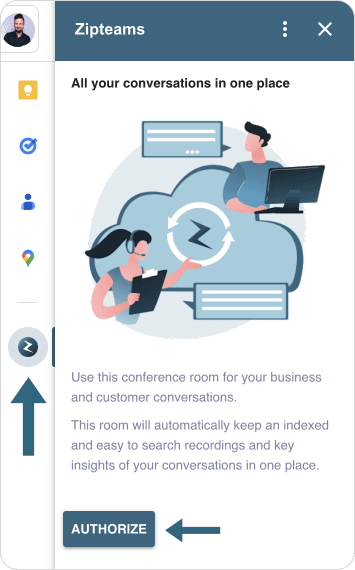
5After successfully installing Zipteams Add-on, open calendar and click on the Zipteams icon on the right bar. Click on

None
Google Calendar setup · Step 2

“Authorize”

button.

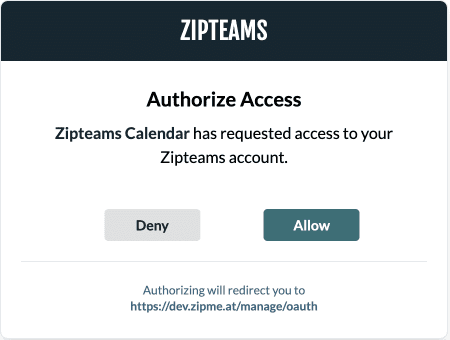
6Grant Zipteams Calendar the access to you Zipteams account.

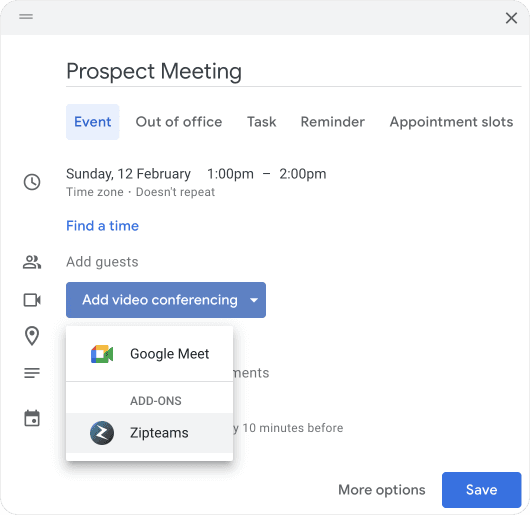
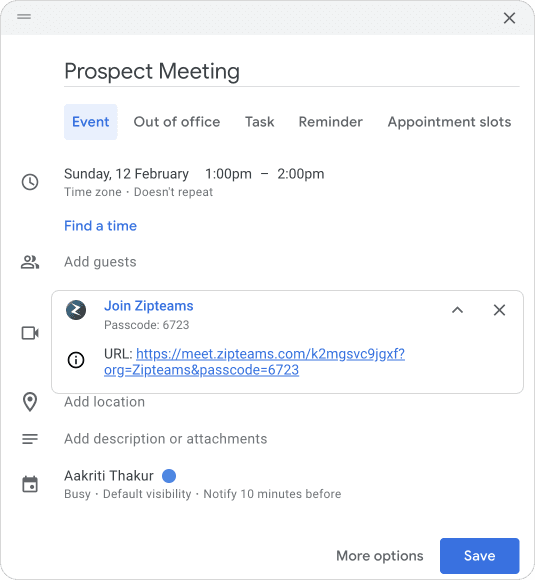
7After authorization is completed, you can now schedule your meeting with Zipteams now.

None
Google Calendar setup · Step 3
None
Google Calendar setup · Step 4
None
Google Calendar setup · Step 5
None
Google Calendar setup · Step 6
None
Google Calendar setup · Step 7
None
Google Calendar setup · Step 8
READY TO CONNECT?

Put ZIP to work with Google Calendar.

Connect your tools once. Then let ZIP use the same customer context across every sales workflow.

Get started with ZIP ↗